From Magic to Malware: How OpenClaw Skills Turned Into a Supply-Chain Attack Surface (And How to Scan Them)
IMPORTANT
TL;DR: 1Password’s security team showed that the top-downloaded OpenClaw skill on ClawHub was literally a malware delivery chain, not a helper add-on. Subsequent reporting found hundreds of malicious skills stealing crypto, credentials, and browser data, while Cisco’s AI Defense team measured that about 26% of 31,000 agent skills in the wild contain at least one vulnerability. Together, these findings prove that OpenClaw’s skills ecosystem is now a high-risk software supply chain—and that every skill you install should be scanned and treated like untrusted code. Cisco’s open-source Skill Scanner is an important first line of defense.
This article builds on Jason Meller’s 1Password research, independent malware analyses, and Cisco AI Defense’s Skill Scanner work to explain what went wrong in OpenClaw’s skills marketplace and how security teams can respond.
1. Skills Are Not “Docs”—They Are Installers with Full Agent Privileges
In OpenClaw and other agent frameworks, a skill is usually a folder centered around SKILL.md (or similar) plus optional scripts and assets. In theory, it is “documentation + configuration” that tells an agent how to perform a task. In practice, these files:
- Contain copy‑and‑paste terminal commands.
- Link to external installers and scripts.
- Describe how to wire tools with real credentials and filesystem access.
1Password’s Jason Meller stresses that in an agent ecosystem, markdown is executable intent:
- Skills tell humans “run this command” and “install this prerequisite.”
- Skills tell agents “follow these steps,” which agents can enact via shell tools or browser automation.
- Skills can bundle code alongside markdown, so execution happens outside any structured interface like Model Context Protocol (MCP).
This means that skills in OpenClaw (and any Agent Skills–compatible framework) are effectively installers with your agent’s full privileges, not just harmless text.
2. 1Password’s Finding: The Most Popular OpenClaw Skill Was a Malware Delivery Chain
Meller’s post walks through a concrete, real‑world example:
- While browsing ClawHub, he inspected the top‑downloaded “Twitter” skill.
- The skill’s overview looked normal—description, usage, feature summary.
- The very first step, however, was to install a “required dependency” called
openclaw-corevia a link. - Those links pointed to attacker‑controlled staging infrastructure.
The execution chain:
- The skill instructs the user/agent to install a “prerequisite.”
- The prerequisite link leads to a webpage crafted to convince the agent or user to run a command.
- That command decodes an obfuscated payload and executes it.
- The payload fetches a second‑stage script.
- The script downloads and executes a binary, removing macOS quarantine attributes so Gatekeeper does not block it.
- The resulting binary is identified by VirusTotal as macOS infostealing malware.
The malware’s goal is classic infostealer behavior:
- Browser cookies and sessions
- Saved passwords and autofill data
- Developer tokens and API keys
- SSH keys and cloud credentials
In other words, exactly the secrets OpenClaw users are most likely to have on their machines.
Crucially, this was not some obscure, low‑download extension. It was the #1 skill on the marketplace at the time of analysis, with its ranking apparently gamed to the top for maximum reach.
3. Not a One‑Off: Hundreds of Malicious Skills Across ClawHub
1Password’s finding was the leading edge of a much larger campaign. Multiple independent sources now agree on the scale:
- OpenSourceMalware and other researchers tracked hundreds of malicious skills uploaded to ClawHub and GitHub within a few days.
- Numbers vary across reports, but ranges include 230+, 341, and 414+ malicious skills discovered in less than a week.
- The skills masqueraded as crypto trading tools, portfolio managers, and social media automators, while delivering information‑stealing malware targeting:
- Exchange API keys
- Wallet private keys
- SSH credentials
- Browser passwords and cookies
- Many skills shared command‑and‑control infrastructure, indicating a coordinated campaign, not random copycats.
OpenSourceMalware and follow‑up reporting emphasize that these malicious skills:
- Frequently reached the front page or “most popular” lists before removal.
- Relied heavily on social engineering, asking users to paste obfuscated one‑liner commands during setup.
- Exploited the assumption that marketplace listings are inherently vetted.
Taken together, this means OpenClaw’s skills ecosystem has already been used as a software supply‑chain for commodity malware, not just a theoretical risk.
4. Cisco’s Skill Scanner Results: 26% of Agent Skills Contain Vulnerabilities
Cisco’s AI Defense team approached the same class of problems from a broader, cross‑platform perspective:
- They analyzed 31,000+ agent skills across ecosystems (including OpenClaw, Anthropic skills, and others).
- At least 26% of those skills contained one or more security vulnerabilities.
- In OpenClaw’s case, they used their open‑source Skill Scanner to test a popular community skill dubbed “What Would Elon Do?” and found:
- Nine security findings total
- Two critical severity issues (active data exfiltration and direct prompt injection)
- Multiple high‑severity issues including command injection and tool poisoning
More broadly, Cisco’s research highlights how agent skills routinely:
- Execute code on the host system with the agent’s privileges
- Access environment variables and
.envfiles with API keys and DB credentials - Make arbitrary outbound network calls
- Influence agent behavior through prompt engineering
- Leverage long‑term agent memory across sessions
The takeaway: skills are a first‑class part of the software supply chain, and their risk profile looks much closer to unvetted npm/PyPI packages than to static documentation.
5. Why OpenClaw Is Uniquely Exposed
All agent ecosystems face some version of this problem, but several OpenClaw design choices amplify the risk:
-
Deep host integration by default
OpenClaw agents commonly run with:- Shell execution rights
- Broad filesystem access
- Browser control and session access
- Direct integrations with chat apps and wallets
-
Skills run with full agent privileges
Skills are treated as trusted code extensions. Once installed, they inherit whatever the agent can do. -
Marketplace incentives reward popularity, not safety
ClawHub and similar registries prioritize downloads and stars over security reviews or provenance. -
Prompt‑centric defenses are fragile
As other research (e.g., ZeroLeaks Audit) has shown, OpenClaw’s agents are highly susceptible to prompt injection and system‑prompt extraction, meaning malicious skills can often override or bypass safety rails. -
No robust certification or signing model for community skills
There is currently no widely adopted code‑signing, reputation, or certification program for OpenClaw extensions.
This makes OpenClaw a near‑perfect laboratory for adversaries: high‑value targets, powerful privileges, and relatively weak pre‑deployment checks.
6. Immediate Incident-Response Checklist
If you (or your team) have installed OpenClaw skills—especially crypto, finance, or social‑automation extensions—treat this as a potential incident.
6.1 Stop Using the Affected Machine for Sensitive Work
- Disconnect from corporate VPNs and production networks.
- Pause access to admin consoles, cloud dashboards, and CI/CD systems.
- If this was a corporate device, inform your security team immediately, referencing the OpenClaw skills malware reports.
6.2 Rotate High‑Value Secrets First
Following Meller’s recommendations and broader incident‑response best practices:
- Sign out of browsers and invalidate sessions.
- Rotate:
- Cloud provider console credentials
- SSH keys and bastion access
- Exchange and wallet API keys
- Source‑control tokens (GitHub, GitLab, etc.)
- Review recent logins and activity for anomalies.
6.3 Forensically Review the System
- Check for suspicious launch agents, startup items, or cron jobs.
- Scan for binaries or scripts placed in temporary or user directories around the time you installed skills.
- Use EDR/AV tools to hunt for known indicators of compromise associated with OpenClaw infostealers.
If the system handled production secrets or high‑value wallets, seriously consider full OS reinstallation from a trusted image after collecting necessary forensic data.
7. Preventive Controls: Scanning and Gating Skills with Cisco’s Skill Scanner
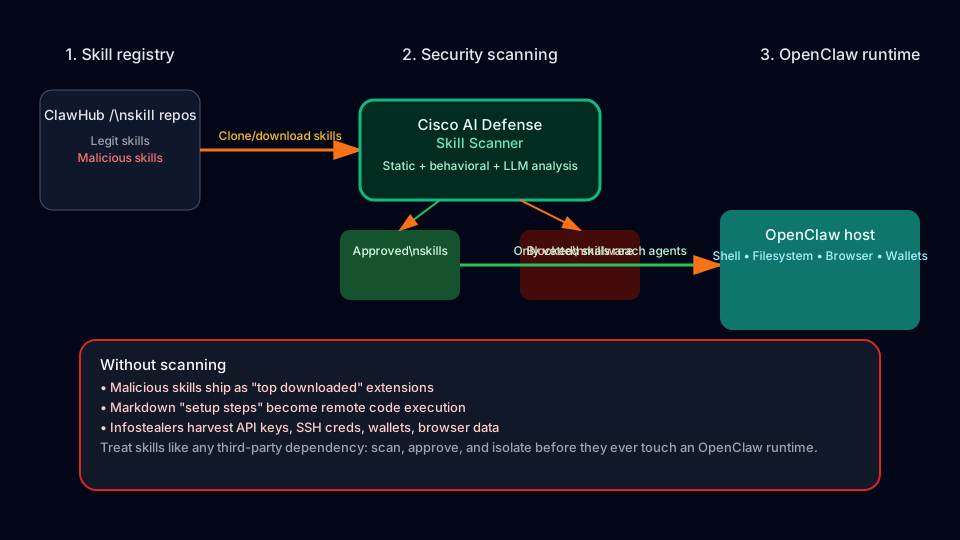
Manual code review for every skill does not scale. This is exactly the problem Cisco’s Skill Scanner aims to address.
7.1 What Skill Scanner Does
According to the project documentation and Cisco AI Defense announcements, Skill Scanner:
- Scans agent skills for:
- Prompt‑injection patterns
- Data‑exfiltration flows
- Suspicious or malicious code constructs
- Uses multi‑engine detection:
- Static pattern‑based rules (YAML/YARA)
- Behavioral data‑flow analysis
- LLM‑assisted semantic analysis (“LLM as a judge”)
- Optional cloud‑based inspection via Cisco AI Defense and VirusTotal
- Produces CI/CD‑friendly outputs:
- SARIF for GitHub Code Scanning
- Exit codes so builds can fail on high‑severity findings
- Is extensible, with a plugin architecture for custom analyzers.
In other words, it treats skills exactly as they should be treated: like third‑party dependencies that require automated security review before deployment.
7.2 How to Integrate Skill Scanner into an OpenClaw Workflow
At a high level, a hardened OpenClaw skills pipeline looks like this:
- Clone or download skills into a dedicated repo, not directly into your live OpenClaw instance.
- Run Skill Scanner over the skills directory using its CLI or CI integration.
- Fail the pipeline if critical or high‑severity issues are detected.
- Review the generated report for medium/low findings and decide whether to:
- Reject the skill
- Fork and patch it
- Accept with compensating controls (e.g., extra sandboxing)
- Only deploy approved skills to your production‑adjacent OpenClaw environment.
This mirrors standard DevSecOps practices for libraries and containers, applied to the AI‑agent skill layer.
8. Additional Hardening: Reducing Skill Blast Radius
Even with Skill Scanner, skills should not be granted unconstrained power.
8.1 Isolate OpenClaw from Crown-Jewel Systems
- Run OpenClaw on dedicated, hardened machines or cloud VMs, not developer laptops.
- Prefer a locked‑down cloud VM (for example, a small, firewall‑protected DigitalOcean Droplet) with:
- Strict inbound firewall rules
- No persistent access to production databases or admin consoles
- Segregated networks for experiment vs. production traffic
8.2 Minimize Tool and Data Access Per Agent
- Start from deny‑by‑default: no shell, no broad filesystem access, no wallets.
- Only enable tools strictly required for a given workflow.
- Use separate agents for high‑risk tasks and never mix experimental skills with production workflows.
- See our Gateway Hardening Guide for detailed steps.
8.3 Maintain a Curated Skill Allowlist
- Create and maintain an internal allowlist of vetted skills.
- Pin versions and store approved copies in a private registry or repository.
- Re‑scan skills on updates and require review before promotion to “approved.”
8.4 Monitor Agent Behavior and Skill Activity
- Log all shell commands, file reads/writes, and external network calls triggered by OpenClaw.
- Tag log events with the originating skill name and version when possible.
- Alert on high‑risk behaviors (e.g., mass credential file access, outbound connections to unknown domains) and have kill‑switches ready.
9. For Registry Operators and Framework Builders
If you operate a skill registry or build agent frameworks, 1Password and Cisco’s findings are a clear call to action:
- Assume skills will be weaponized. Design as if adversaries are already trying to abuse your marketplace.
- Scan submissions automatically. Integrate tools like Skill Scanner into your publish pipeline and block uploads with critical findings.
- Add provenance and publisher reputation. Track verified publishers, signing keys, and historical behavior.
- Flag risky patterns in UI. One‑liner terminal commands, external binary downloads, quarantine bypasses, and encoded payloads should be highlighted or blocked.
- Expose security metadata to users. Show last‑scan date, severity findings, and whether a skill passed automated checks.
Markdown‑based skills are the new package.json: deceptively simple, but central to the safety of the entire ecosystem.
10. Key Takeaways for Securing OpenClaw’s Skills System
- Skills are executable supply chain, not static docs. In OpenClaw, a SKILL.md file is an installer that can lead directly to remote code execution and infostealing malware.
- The risk is systemic, not anecdotal. Hundreds of malicious skills have already been found across ClawHub and GitHub, and about a quarter of all analyzed agent skills contain vulnerabilities.
- OpenClaw’s architecture magnifies impact. Deep host integration plus weak marketplace vetting turns each malicious skill into a potential full‑system compromise.
- Skill Scanner and similar tools are now table stakes. Cisco’s Skill Scanner provides multi‑engine analysis, CI/CD integration, and actionable findings, making it a practical baseline control for any OpenClaw deployment.
- Governance must extend to the agent layer. Treat OpenClaw and its skills like any other third‑party software in your supply chain: scan them, isolate them, monitor them, and never run them unvetted on devices with production access.
Handled correctly, the “magic to malware” moment can push organizations to treat agent skills as a first‑class security concern. Combined with strong infrastructure isolation and automated scanning, teams can keep experimenting with OpenClaw and similar tools—without turning their agents into open doors for the next wave of malware campaigns.
Stay safe and scan your skills. 🦞